Skip to content

Configure process and To-Do handover ​

Hand over the original Handler in a Process definition or To-Do tasks to a new Handler.

Overview ​

Process and To-Do Handover applies when a User resigns, changes roles, takes long-term leave, or when Organization adjustment occurs. It transfers Process handling responsibilities under a Designated Personnel to a new Handler, which prevents processes or To-Do tasks from staying Pending for too long.

The page contains two tabs:

  • Process definition Handover: Batch replace Handlers in Process definitions. This affects tasks that are not Generated and processes initiated in the future.
  • To-Do Handover: Directly hand over Generated To-Do tasks. This suits current backlog To-Do tasks.

Key capabilities ​

Process and To-Do Handover Supports these capabilities:

  • Support Process definition Handover: Filter Process definitions that include an original Handler, and Batch replace that Handler with a new Handler.
  • Support To-Do Handover: Hand over Generated To-Do tasks from the original Handler to the target Handler.
  • Support filtering by Process Type: Filter Process definitions or To-Do tasks by Process Type, such as Approval flow.
  • Support filtering by Trigger Object: Narrow the Handover scope by Object to avoid handing over unrelated processes by mistake.
  • Support Including historical versions: After you select Include historical versions, Handlers in historical Process versions are Included in the Handover scope.
  • Support Batch Handover: Select multiple Process definitions and replace Handlers in Batch.
  • Support Handover record query: View Handover records in a Time range for audit and traceability.

Before you begin ​

  • You have Process Handover or Process management permission.
  • You have Confirmed the original Handler and target Handler.
  • You have Confirmed whether you need to hand over Process definitions, Generated To-Do tasks, or both.
  • You have Confirmed the Handover scope, such as Process Type, Trigger Object, Process Version, and specific Process definitions.

Configure Process definition Handover ​

Process definition Handover replaces configured Handlers in Process definitions. It suits Organization adjustment, resignation, and long-term responsibility changes.

  1. Go to Setup > Process management > Process Handover.
  2. Open the Process definition Handover tab.
  3. In Handover list, select Filter conditions:
    • Handler Type, such as Personnel.
    • Original Handler.
    • Trigger Object.
    • Process Type.
    • Whether to Include historical versions.
  4. Select the Process definitions to hand over in the list.
  5. Click Batch Handover.
  6. In Replace with, select the target Handler.
  7. Click Confirm.

The Process definition Handover list displays:

FieldDescription
Process NameProcess definition Name
ApiNameProcess definition API identifier
Process VersionProcess Version in the current list
Process TypeFor example, Approval flow
Trigger ObjectBusiness Object associated with the Process
DetailsMatched Handler or Node Content in the current Process definition

Batch hand over Handlers ​

Batch Handover replaces the matched original Handler in selected Process definitions with a new Handler.

Note these requirements:
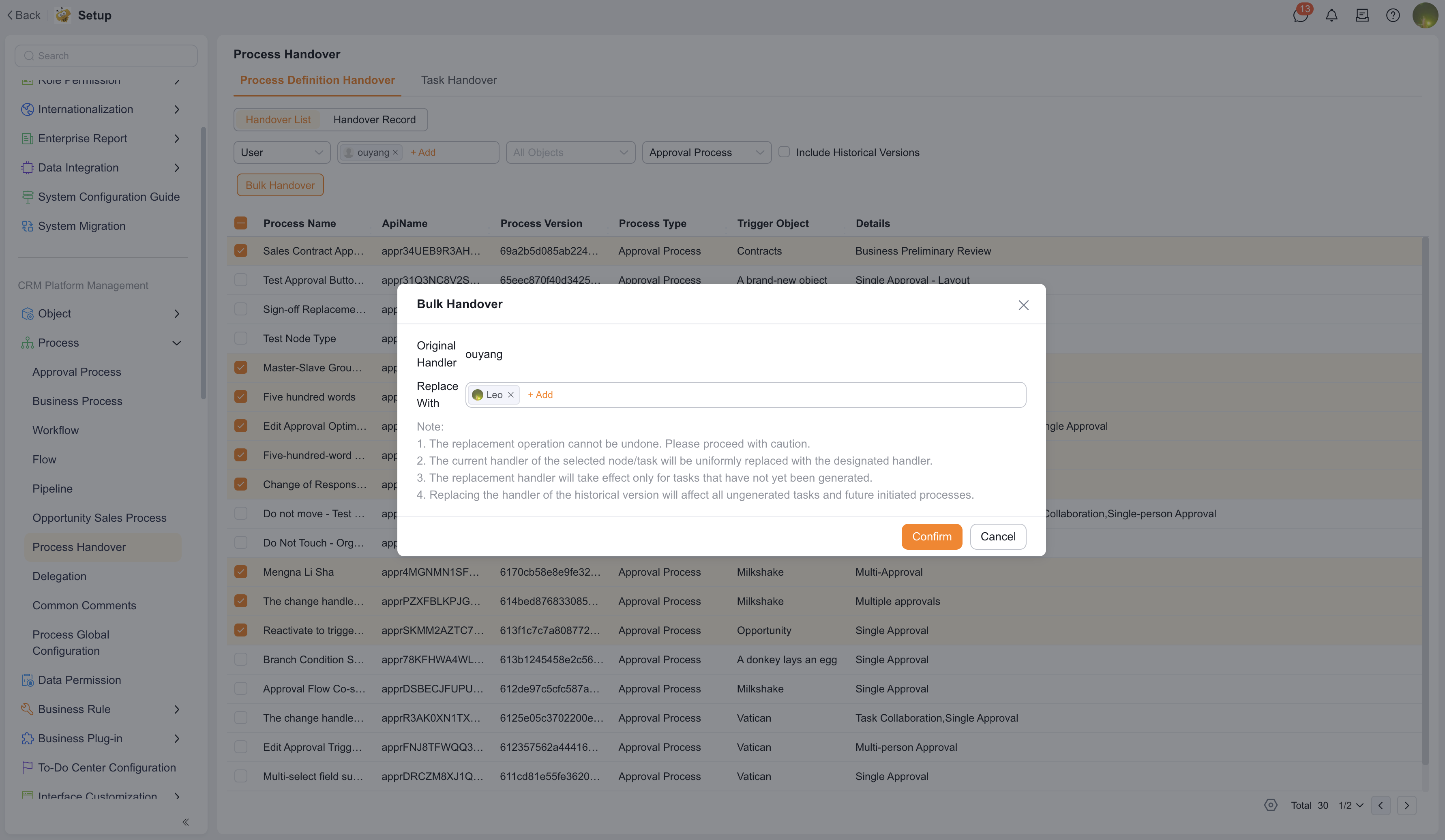
  • The replace Operation cannot be restored. Confirm carefully before execution.
  • The Current Handler in selected nodes or tasks is replaced with the specified Handler.
  • The replacement Handler takes Effect only for tasks that are not yet Generated.
  • Replacing Handlers in historical versions affects all ungenerated tasks and future Process initiations.

Process definition Handover

View Handover records ​

Handover records support audit and tracking of historical Handover operations.

  1. Open Process definition Handover > Handover records.
  2. Select an Object or Time range.
  3. View the Handover record list.

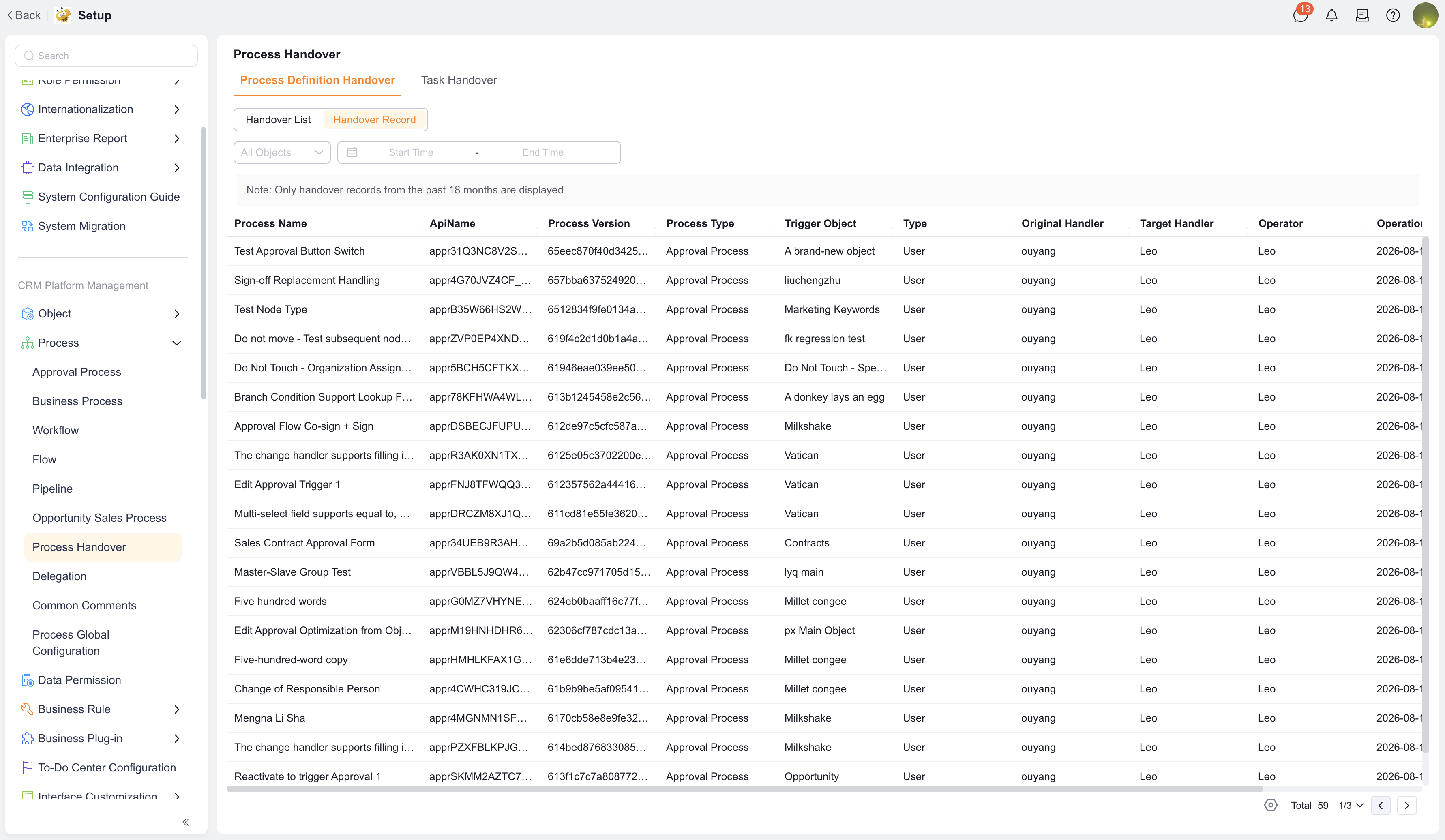
The page Notice says that only Handover records from the last 18 months Within Enterprise are displayed.

The Handover record list displays:

FieldDescription
Process NameName of the handed-over Process
ApiNameProcess API identifier
Process VersionVersion of the handed-over Process
Process TypeFor example, Approval flow
Trigger ObjectObject associated with the Process
TypeHandover Type, such as Personnel
Original HandlerHandler before Handover
Target HandlerHandler after Handover
OperatorPersonnel who performed the Handover Operation
Operation TimeHandover Operation Time
DetailsNode, Approval Type, or other Description involved in the Handover

Handover records

Configure To-Do Handover ​

To-Do Handover handles Generated but Not Completed To-Do tasks. It suits cases where the original Handler is Unable to Process current To-Do tasks and the tasks need to Transfer in to a target Handler.

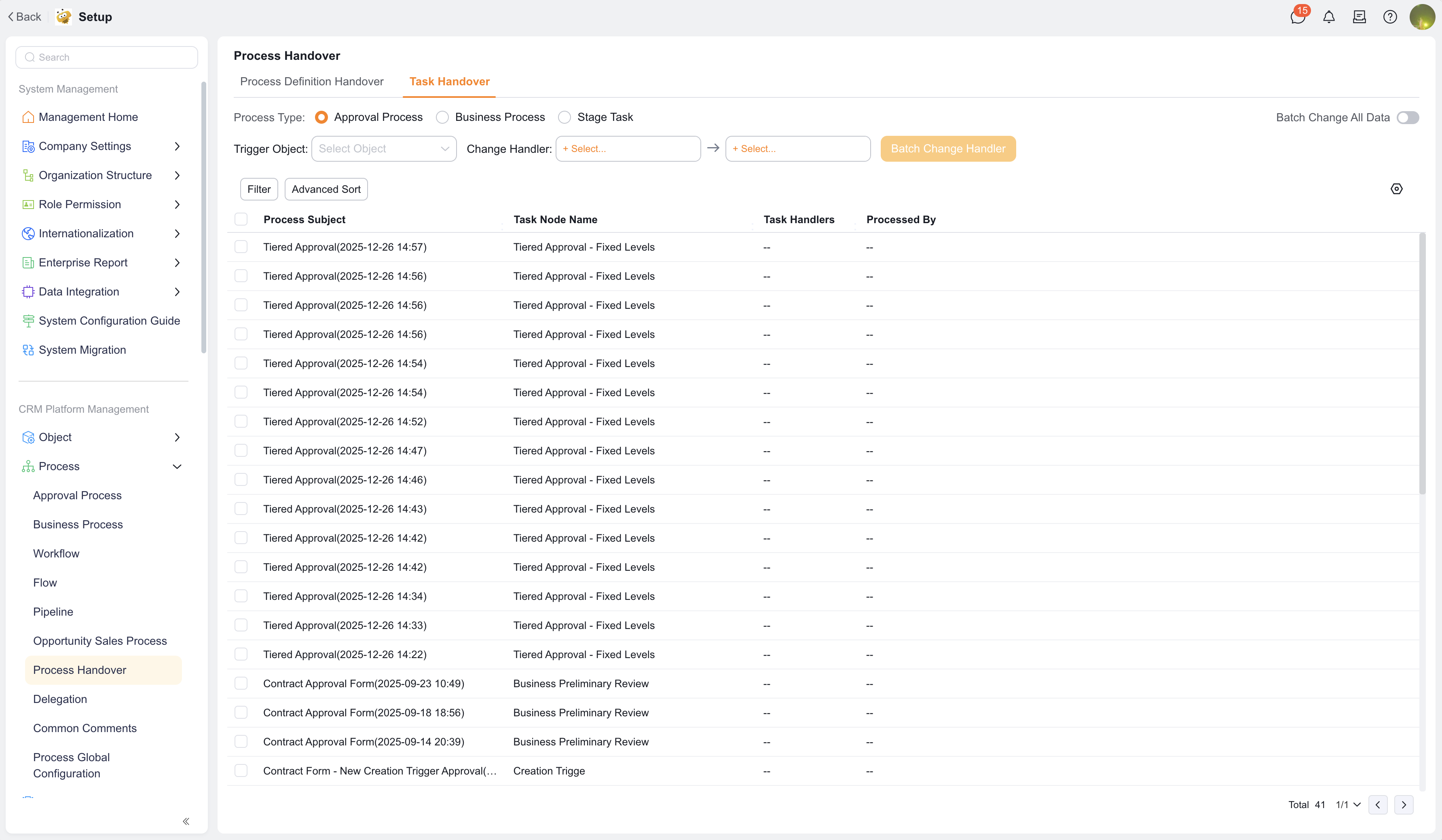
The To-Do Handover page Supports filtering and Batch replacement of To-Do Handlers by Process Type, Trigger Object, original Handler, and target Handler.

Filter To-Do tasks ​

  1. Go to Process Handover > To-Do Handover.
  2. In Select Process Type, select the Task Type to hand over:
    • Approval flow.
    • Business flow.
    • Stage tasks.
  3. In Trigger Object, select an Object, such as Account.
  4. On the left side of Change Handler, select the original Handler.
  5. On the right side of Change Handler, select the target Handler.
  6. Click Filter to View matching To-Do tasks.
  7. To Location tasks with more fields, Click Advanced Sorting or adjust list fields.

Batch change Handler ​

After To-Do tasks are filtered, you can replace the Handler in Batch.

  1. Select the tasks to hand over in the To-Do list.
  2. Confirm the original Handler and target Handler.
  3. Click Batch change Handler.
  4. Check the Help Text in the confirmation dialog.
  5. Click Confirm.

If you need to replace all To-Do tasks under the current original Handler, Enable Batch change all data. After it is enabled, the System counts the number of processes for the original Handler based on the current Filter conditions, and replaces Handlers for all matching data in Batch.

WARNING

Batch change Handler directly affects To-Do ownership. Before execution, confirm that the target Handler has access to the corresponding Object and permission to handle the Process.

To-Do Handover impact scope ​

To-Do Handover usually affects only Generated and Not Completed To-Do tasks. It does not change future Handler configuration in Process definitions. If you also need to affect future new tasks, perform Process definition Handover at the same time.

Note these rules:

  • If you select only some tasks, only selected To-Do tasks are handed over.
  • If you Enable Batch change all data, all matching To-Do tasks are replaced in Batch based on current Filter conditions.
  • The confirmation dialog displays the target Handler. For example: Confirm Batch Handler replacement from Alex to Jordan?
  • After Handover, use the target Handler account to Visit the To-Do Center and verify that tasks have been transferred in.

Differences between Process definition Handover and To-Do Handover ​

Handover TypeImpact scopeUse case
Process definition HandoverReplaces Handlers in Process definitions, affecting ungenerated tasks and future Process initiationsResignation, role adjustment, and long-term Organization responsibility changes
To-Do HandoverTransfers current Generated To-Do tasksThe original Handler is temporarily Unable to Process current To-Do tasks, or To-Do tasks are backlogged

To-Do Handover

Notes ​

  • Before Handover, confirm that the target Handler has Object access, Related Object access when needed, and Process handling permission.
  • Process definition Handover does not automatically process Generated To-Do tasks. If you need to handle current To-Do tasks, perform To-Do Handover at the same time.
  • To-Do Handover usually does not change historical Approval comments.
  • Batch replacement cannot be restored. Narrow the Filter scope and check the list before execution.
  • If Process Delegation exists, manually confirm the Priority when Delegation and Handover both exist.

Expected result and validation ​

  1. Select a test Process definition and perform Process definition Handover.
  2. Initiate the Process again and check whether the new task is assigned to the target Handler.
  3. Perform To-Do Handover for Generated To-Do tasks.
  4. Use the target Handler account to enter the To-Do Center and check whether To-Do tasks are transferred in.
  5. View Handover records and confirm that original Handler, target Handler, Operator, and Operation Time are recorded correctly.