Appearance


Use OCR (Optical Character Recognition) technology to automatically recognize text in images or attachments and populate the corresponding fields.
| Type | Business scenario |
|---|---|
| Card recognition - ID card | Automatically recognize and capture identity information for real-name authentication in finance, insurance, e-commerce, O2O, and live-streaming scenarios. This reduces user input effort and mitigates business risk |
| Card recognition - Bank card | Remote financial identity authentication for user verification in financial scenarios, improving user experience |
| Card recognition - Business license | Merchant qualification review for onboarding in e-commerce, retail, and O2O industries. Enables automated review and capture of merchant information |
| Card recognition - Household register | Identity information registration. Recognizes name, gender, birthplace, date of birth, and ID number for government service scenarios |
| Card recognition - Passport | Used for overseas travel bookings, hotel check-in registration, and other scenarios that require automated passport data entry |
| Financial documents - Receipts | Financial and tax reimbursement. Quickly processes various reimbursement vouchers through automated segmentation and structured recognition, reducing manual effort and improving accounting efficiency |
| Transportation - Vehicle registration | Driver identity authentication. Combines vehicle registration, driver's license, and ID card recognition to automatically capture driver and vehicle information |
| General type | Paper document digitization. Improves efficiency in data entry, archiving, and retrieval |
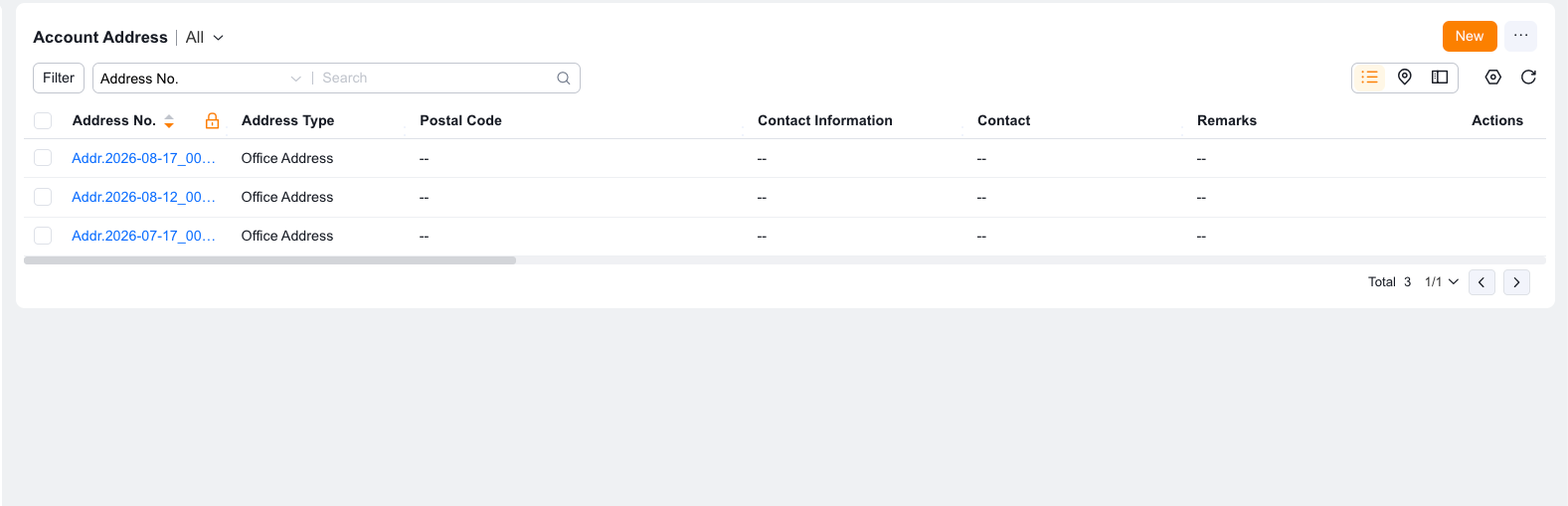
Create the fields that will store the recognized information. For example, create fields to store the name and ID number from an ID card.
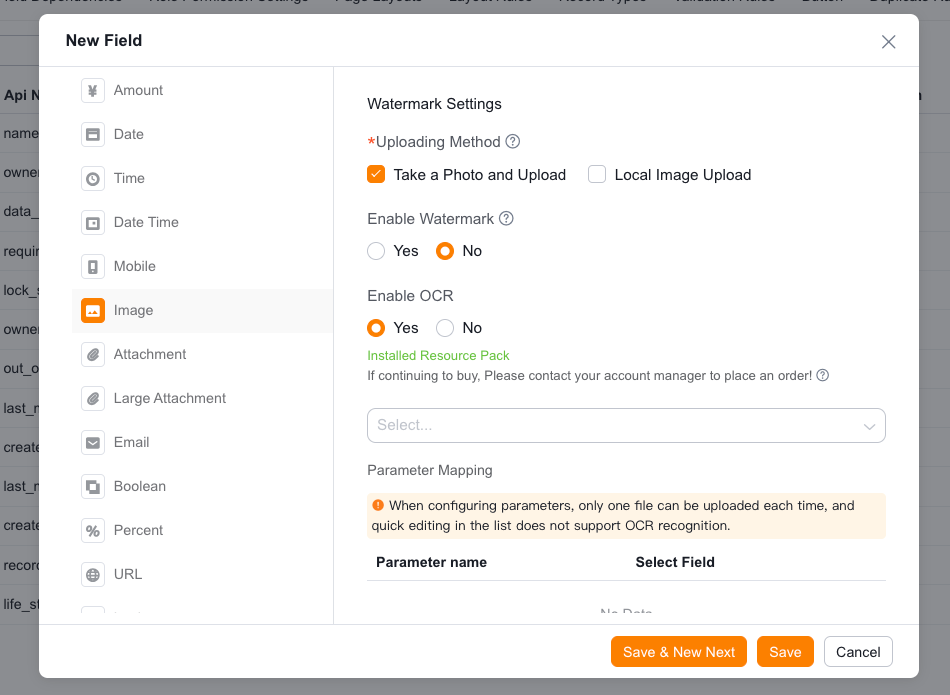
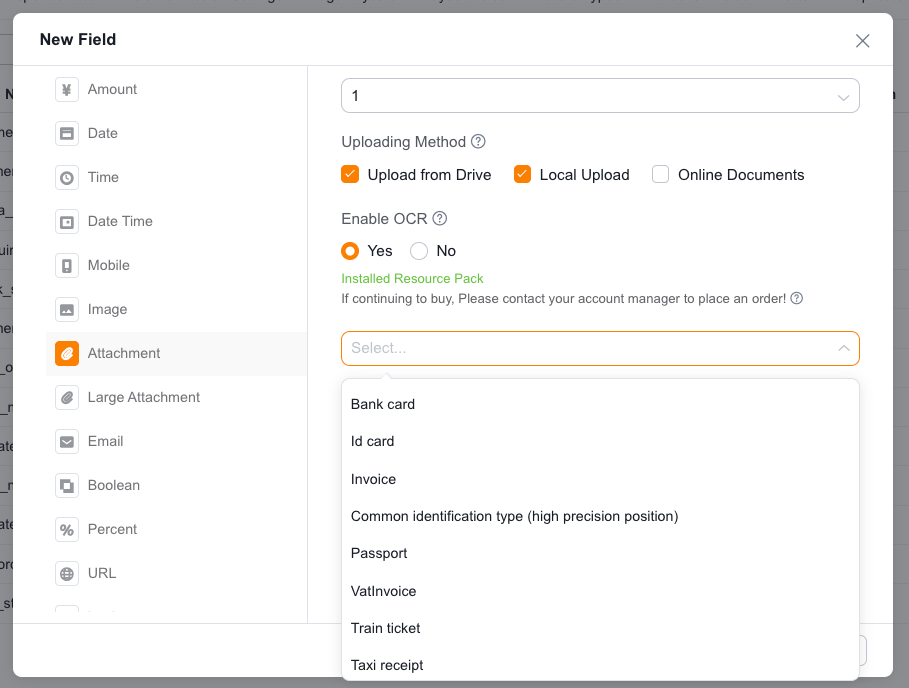
After the resource package takes effect, create an image or attachment field on the object (or use an existing field), enable OCR, select the recognition type, and configure field mapping. The following example uses the ID card type:
NOTE
The example above demonstrates OCR recognition for images. The process for attachment-based OCR recognition is similar.
The following five common situations may affect OCR recognition accuracy:
| Error code | Error message | Description |
|---|---|---|
| 1 | Unknown error | Unknown error. Retry the request |
| 2 | Service temporarily unavailable | Service is temporarily unavailable. Retry the request |
| 3 | Unsupported openapi method | The API does not exist. Check the request URL |
| 4 | Open api request limit reached | Cluster request limit exceeded. Retry the request |
| 6 | No permission to access data | No API call permission. Contact the product team |
| 17 | Open api daily request limit reached | Free trial resources exhausted. Daily request limit exceeded |
| 18 | Open api qps request limit reached | QPS limit exceeded. After enabling pay-as-you-go or purchasing a quota package, the concurrency limit is 10 QPS |
| 19 | Open api total request limit reached | Total request limit exceeded. Contact the product team |
| 100 | Invalid parameter | Invalid access_token parameter. Token retrieval failed |
| 110 | Access token invalid | Invalid access_token. The token is valid for 30 days and must be refreshed periodically |
| 111 | Access token expired | Expired access_token. The token is valid for 30 days and must be refreshed periodically |
| 216100 | invalid param | The request contains invalid parameters |
| 216101 | not enough param | Required parameters are missing |
| 216102 | service not support | The requested service is not supported |
| 216103 | param too long | One or more parameters in the request are too long |
| 216110 | appid not exist | The appid does not exist. Verify the information |
| 216200 | empty image | The image is empty |
| 216201 | image format error | Unsupported image format. Supported formats: PNG, JPG, JPEG, BMP, TIFF, PNM, WebP |
| 216202 | image size error | Invalid image size. The image must be smaller than 4 MB after Base64 encoding and no larger than 4096×4096 pixels |
| 216306 | Upload file error | File upload failed. Check the request parameters |
| 216308 | Pdf_file_num exceeds | The pdf_file_num parameter exceeds the actual number of pages in the PDF file |
| 216401 | Create task failed | Failed to submit the request |
| 216402 | Query task failed | Failed to retrieve results |
| 216603 | Check pdf page num failed | Failed to retrieve the number of pages in the PDF file |
| 216604 | Insufficient available quota | Total request quota exceeded. Purchase or request additional quota |
| 216630 | recognize error | Recognition error. Ensure the image contains the corresponding card or document |
| 216631 | recognize bank card error | Bank card recognition error. The card is not front-facing, incomplete, or blurry |
| 216633 | recognize idcard error | ID card recognition error. The document is not an ID card, or it is incomplete or blurry |
| 216634 | detect error | Detection error. Retry the request |
| 216600 | business verify failed | Enterprise verification service request failed. Applies only to enterprise verification services |
| 282000 | internal error | Internal server error. High-precision interfaces may time out due to excessive text. Split the text and retry |
| 282003 | missing parameters | Request parameters are missing |
| 282005 | batch processing error | One or more errors occurred during batch task processing |
| 282006 | batch task limit reached | Batch task count exceeds the limit. Reduce the count to 10 or fewer |
| 282100 | image transcode error | Image compression and transcoding error |
| 282102 | target detect error | No recognition target detected in the image. The image is not a card/document, or it is incomplete or blurry |
| 282103 | target recognize error | Target recognition error. The image is not a card/document, or it is incomplete or blurry |
| 282110 | urls not exist | The URL parameter does not exist |
| 282111 | url format illegal | Invalid URL format |
| 282112 | url download timeout | URL download timed out. The image is larger than 3 MB or hotlink protection is enabled |
| 282113 | url response invalid | The URL returned an invalid parameter |
| 282114 | url size error | The URL exceeds 1024 bytes or is empty |
| 282134 | officialWeb service exception | VAT invoice verification interface timed out due to a tax bureau network issue. Retry the next day |
| 282808 | request id not exist | The request ID does not exist |
| 282809 | result type error | Incorrect result type in the response |
| 282810 | image recognize error | Image recognition error. Retry the request |
TIP
If these errors persist, contact the product team for assistance.