Skip to content

Configure process delegation ​

Let a Designated Personnel handle Process tasks during the Delegation time.

Overview ​

Process Delegation applies when a Delegator is on a business trip, on leave, temporarily authorizes another person, or needs role collaboration. The Delegate handles Process tasks within a Specified Range for the Delegator. Administrators can Configure Tenant-level Delegation in Setup. Users can Configure Personal Level Delegation in personal settings.

Delegation settings Support scope control by Process Type, Object, or specific Process definition. This prevents unrelated Process tasks from being delegated together.

Key capabilities ​

Process Delegation mainly Supports these capabilities:

  • Support Tenant-level Delegation: Administrators can View, New, Edit, and Disable Delegation relationships in Setup. This suits leave, business trips, transfers, or Enterprise-wide task substitution Within Enterprise.
  • Support Personal Level Delegation: Users can maintain their own Delegation relationships in personal settings. This suits temporary absence or short-term substitution.
  • Support multiple Delegation Method options: Delegate by Process Type, by Object, or by Process definition to control the Delegation scope at different levels.
  • Support specified Process scope: When you select By Process Definition, select specific processes from Approval Process, Business Process, Stage Advancement, and Pipeline separately.
  • Support Delegation time settings: Configure the Effective Time and end Time. When the end Time arrives, the Delegation becomes invalid automatically.
  • Support Status management: The Delegation list displays Enable Status and Supports Edit and Disable.
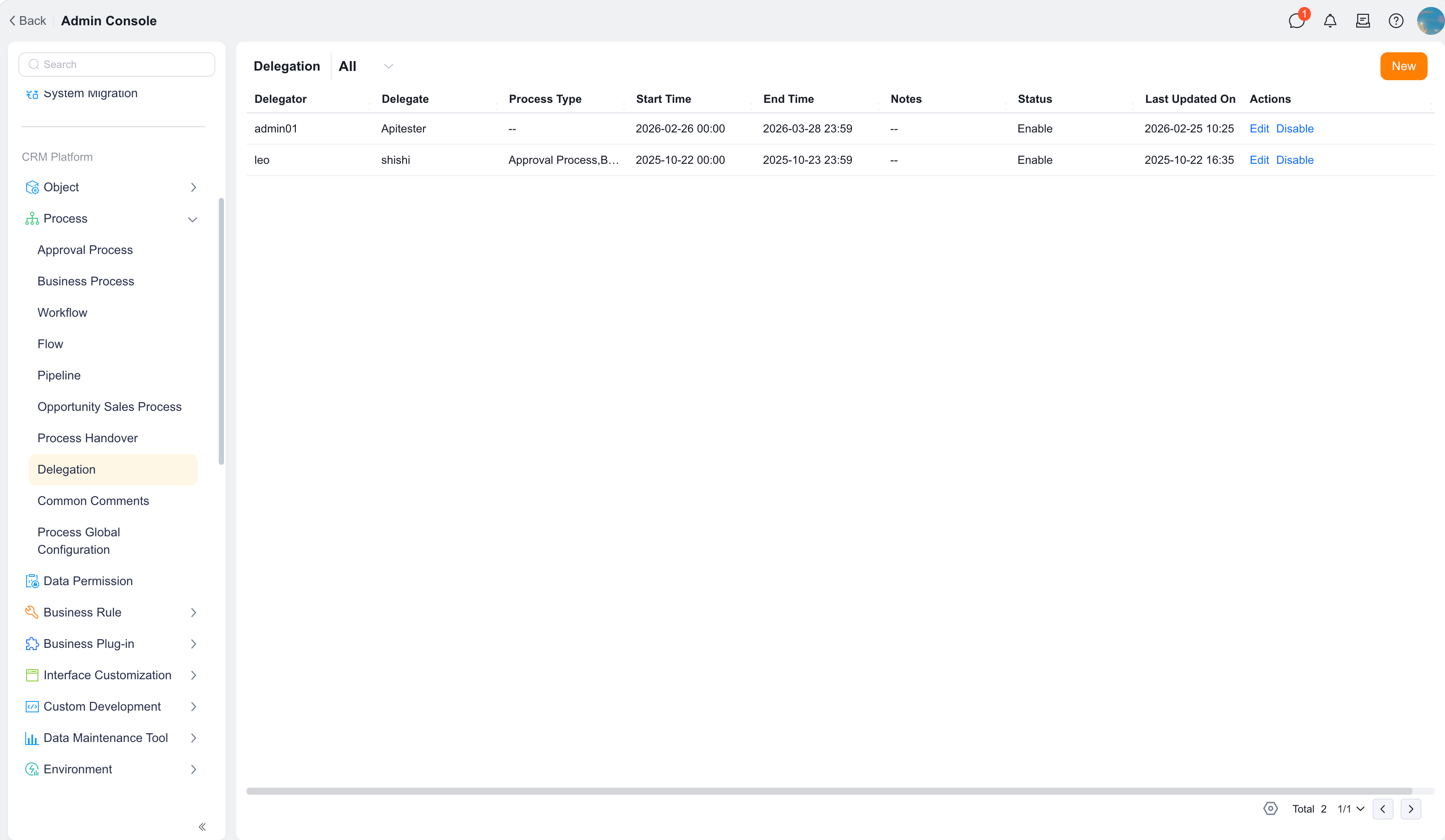
  • Support record query: The list displays Delegator, Delegate, Process Type, Delegation start Time, Delegation end Time, Notes, Status, Last Updated On, and Operation, so administrators can track Delegation relationships.

Before you begin ​

  • You have Delegation settings permission, or the System allows personal Delegation configuration.
  • You have confirmed the Delegator and Delegate.
  • You have confirmed the Delegation Effective Time and end Time.
  • You have confirmed the Delegation scope, such as all processes, a specified Process Type, a specified Object, or a specified Process definition.

Configure Tenant-level Delegation ​

Tenant-level Delegation is configured by administrators in Setup. It suits centralized maintenance of Delegation relationships Within Enterprise.

  1. Go to Setup > Process management > Delegation.
  2. Click New.
  3. In Delegator, select the Personnel whose Process tasks need substitution.
  4. In Delegate, select the Personnel who handles Process tasks on behalf of the Delegator.
  5. In Delegation Method, select the Delegation scope.
  6. Configure Process Type, Object, or specific Process definitions based on the selected Delegation Method.
  7. Set Delegation time, including start Time and end Time.
  8. To explain the Delegation reason, enter Notes.
  9. Click Confirm.

The Tenant-level Delegation list displays:

FieldDescription
DelegatorOriginal Process task Handler
DelegatePersonnel who handles Process tasks on behalf of the Delegator
Process TypeProcess Type to which the Delegation applies, such as Approval flow, business flow, or Pipeline. If unrestricted, -- is displayed
Delegation start TimeTime when Delegation starts to take Effect
Delegation end TimeDelegation end Time
NotesDelegation Description
StatusWhether the current Delegation is Enabled
Last Updated OnMost recent Modified On Time
OperationSupports Edit and Disable

Tenant-level Process Delegation settings

Select a Delegation Method ​

When you create or Edit Delegation, select a Delegation Method based on business needs.

Delegation MethodDescriptionUse case
By Process TypeSet Delegation scope by Approval flow, business flow, Pipeline, or another Process TypeDelegate only one Type of Process task
By ObjectSet Delegation scope by ObjectDelegate only Process tasks related to one Object
By Process DefinitionSelect exact Approval flow, business flow, or Pipeline definitionsDelegate only specified processes, such as selected Account filing Approval flows

Delegate by Process definition ​

By Process Definition precisely controls which Process tasks the Delegate can handle.

During configuration, you can select:

  • Approval flow: Select one or more Approval Process definitions.
  • Business flow: Select one or more Business Process definitions.
  • Pipeline: Select one or more Pipeline definitions.

For example, if a User only needs to delegate Target Management Approval flows such as major Account filing application and Account qualification and agreement Approval to a target administrator, select By Process Definition and choose only those Approval flows.

Configure Personal Level Delegation ​

Personal Level Delegation is configured by users in personal settings. It suits short-term absence or temporary authorization.

  1. Go to Personal settings > Delegation.
  2. Click New or Edit an existing Delegation.
  3. In Delegate, select the Personnel who handles tasks on your behalf.
  4. In Delegation Method, select By Process Type, By Object, or By Process Definition.
  5. Select Process Type, Object, or Process definition based on the selected Delegation Method.
  6. Set Delegation time.
  7. Enter Notes.
  8. Click Confirm.

The Personal Level Delegation list displays only records related to the current user. During personal configuration, the Delegator defaults to the current user.
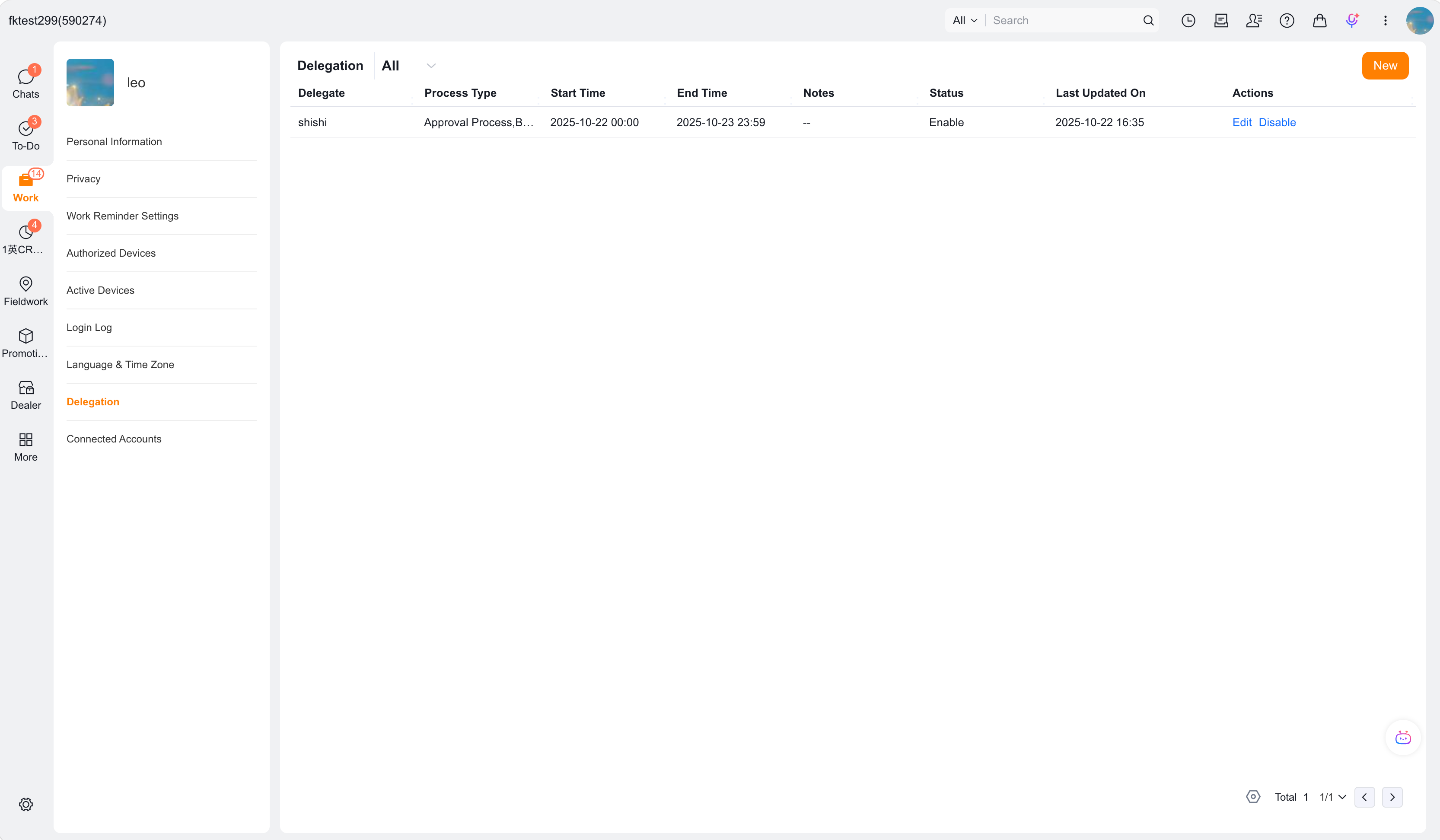
Personal Level Process Delegation settings

Manage Delegation records ​

In the Delegation list, you can View and maintain Delegation records.

Common operations Include:

OperationDescription
EditModify Delegate, Delegation Method, Process scope, Delegation time, or Notes
DisableStop the current Delegation relationship. After Disable, subsequent tasks are no longer handled by the Delegate

Management suggestions:

  • When substitution is no longer needed after Delegation ends, Disable it promptly or wait for automatic expiration.
  • After changing the Delegation scope, use a test Process to verify whether delegated tasks are assigned as expected.
  • For long-term Delegation, regularly review whether the Delegate still has processing permission.

Configuration limits and notes ​

  • Delegator and Delegate cannot be the same person.
  • Delegator and Delegate usually Support selecting only one Personnel each.
  • Avoid Duplicate Setting for the same Delegator, same Delegation scope, and same Time range.
  • After the Delegation end Time expires, Delegation becomes invalid automatically.
  • The Delegate can handle Process tasks only within the Delegation scope and cannot exceed the configured scope.

Expected result and validation ​

  1. Create a Delegation record.
  2. Use the Delegator account to initiate or Receive a Process task that matches the Delegation scope.
  3. Use the Delegate account to check whether the corresponding To-Do item is visible and can be processed.
  4. After you Disable Delegation, verify again that newly generated To-Do items are no longer delegated to the Delegate.
  5. If you use By Process Definition, validate the Delegation Effect for selected and unselected processes separately.