Appearance


Select the matching configuration guide for each node type on the Business Process canvas. Combine nodes based on Participant Role, handling method, and routing rules.
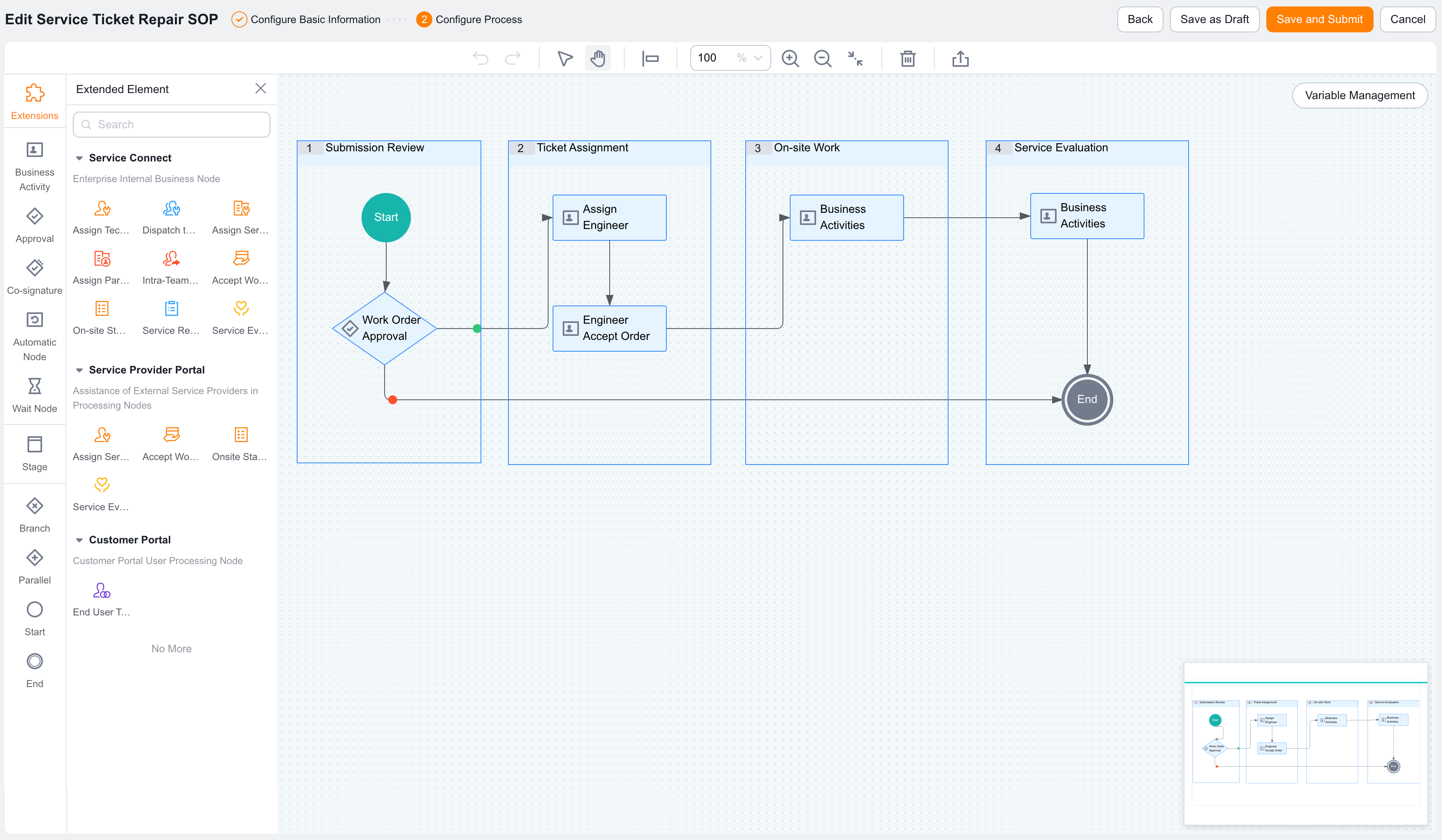
A Business Process combines manual handling, approval, Co-signature, automatic handling, wait, stage, branch, and parallel task nodes. You can drag nodes from the left component area to the canvas, and then configure Node Settings, completion conditions, and post-completion actions in the properties panel on the right.
Business Process nodes usually include common process nodes, extended business nodes, and external collaboration nodes. Common nodes build the main process path. Extended Business Activity nodes support service apps, Service Provider portals, terminal user portals, and similar Business Scenario requirements. External collaboration nodes let External Personnel participate in dispatch, order acceptance, evaluation, or sign-off.
The left node component area of the process canvas includes these entries:
| Entry | Purpose |
|---|---|
| Extension elements | Shows extended business nodes for service apps, Service Provider portals, terminal user portals, and similar applications |
| Business Activity | Adds a business task node handled by internal users |
| Approval | Adds a node that requires an approver to approve or reject |
| Co-signature | Adds a node for multiple users to handle or approve together |
| Automatic Node | Adds a node that the system runs automatically |
| Wait Node | Adds a node that waits by time or Condition Wait before routing continues |
| Stage | Groups multiple nodes into one business stage for staged process management |
| Branch | Routes to different paths based on conditions |
| Parallel | Starts multiple task paths at the same time |
| Start | Marks where the process starts |
| End | Marks where the process ends |
| Node | Purpose | Configuration guide |
|---|---|---|
| Business Activity | Lets employees perform business operations, such as confirming work orders, grading Accounts, completing on-site work, or following up with Accounts | Configure Business Activity nodes |
| Approval Node | Requires handlers to approve, disapprove, reject, or enter different routing paths | Configure Business Process Approval Node settings |
| Co-signature node | Supports joint approval or joint confirmation by multiple users. It is suitable for cross-role decisions | Configure Business Process countersign nodes |
| Extension elements | Connect service apps, Service Provider portals, terminal user portals, and other industry business nodes | Configure extension elements |
| Automatic Node | Runs system actions automatically, such as field updates, notifications, rules, or automatic processing | Configure Automatic Node settings |
| Wait Node | Delays the process or waits until a condition is met before routing continues | Configure Business Process Wait Node settings |
| Stage | Organizes nodes by business stage, such as assigning engineers, on-site work, Service Evaluation, or acceptance | - |
| Branch node | Routes to different paths based on field conditions, Approval Decision results, or business rules | Configure branch nodes |
| Parallel task node | Runs multiple tasks at the same time and waits for one or more branches to complete before continuing | Configure parallel task nodes |
| Start node | Marks the process start. The system usually generates it automatically | - |
| End node | Marks the process end. The process is completed when it reaches this node | - |
In the Extension node panel, you can select extended business nodes by enabled application. The screenshot includes node groups such as Service App, Service Provider Portal, and Terminal User Portal.
Service app nodes are suitable for internal enterprise service processes, such as repair Work Order SOPs, on-site work, service reports, and fee confirmation.
| Node | Common use |
|---|---|
| Assign engineer | Assigns a Work Order to an internal engineer |
| Assign to Service Group | Assigns a Work Order to a service group, where group members continue handling it |
| Assign Service Provider | Dispatches a Work Order to an External Service Provider or Service Provider team |
| Assign personnel within Service Provider group | Assigns a specific handler within the Service Provider team |
| Engineer accepts order | Lets an engineer confirm whether to accept the order |
| On-site Standard Operation | Lets an engineer complete on-site service by a Standard Operation process |
| Inspection group | Arranges an inspection group to inspect service results |
| Service report | Fills in or submits a service report |
| Service Evaluation | Evaluates the service process or result |
| Service fee confirmation | Confirms service fee information |
| Service follow-up | Follows up with the Account after service |
| Service product consumption | Records products or spare parts consumed during service |
| Repair part sign-off | Confirms repair part sign-off |
| Repair part return | Records repair part return actions |
Service Provider portal nodes are suitable when an external Service Provider helps handle service tasks.
| Node | Common use |
|---|---|
| Assign Service Provider | Dispatches a task to a Service Provider in the Service Provider portal |
| Engineer accepts order | Lets an external engineer receive a service task |
| On-site Standard Operation | Lets an external engineer complete on-site Standard Operation |
| Service Evaluation | Lets the Service Provider side or Account side complete Service Evaluation |
Terminal user portal nodes let terminal users participate in process handling.
| Node | Common use |
|---|---|
| Terminal user handling | Lets a terminal user add information, confirm items, or handle a task |
| Terminal user task | Starts a task for a terminal user |
| Account sign-off | Lets an Account or terminal user confirm sign-off |
NOTE
Extended business nodes appear based on enabled business applications and permission settings. Node names and configuration items can differ by enterprise version. Use the actual page as the source of truth.
| Scenario | Recommended node |
|---|---|
| Internal users must fill in, edit, or confirm Business Data | Business Activity node |
| A manager, role, or Designated Personnel must approve | Approval Node |
| Multiple users must confirm or approve together | Co-signature node |
| The process must route by condition | Branch node |
| Multiple tasks must be handled at the same time | Parallel task node |
| The process must wait for a specified time or condition | Wait Node |
| The system must run actions automatically | Automatic Node |
| The process view must be managed by business stage | Stage |
| A service app, Service Provider, or external terminal user must participate | Extended business node |